
What I learned at Devoxx Morocco 2026: Day 2 🇲🇦
Key ideas from day two of Devoxx Morocco 2026, talk by talk, with interactive examples.
- Talk 1: Tour of Agent Protocols: MCP, A2A, AG-UI, A2UI, AP2, UCP
- MCP: tools and data
- A2A: agents talking to agents
- AG-UI: agent to frontend
- A2UI: the agent generates the UI
- AP2 and UCP: agents that shop and pay
- Resources
- Talk 2: My Fixes Became the Lesson: Teaching AI Better Coding Habits
- What a skill is
- Progressive disclosure
- Build the skill from your corrections
- Turn the replay into evals
- Read the evals: agents cheat
- When the skill doesn't trigger, fix the description
- Keep the skill learning
- When to write a skill
- A skill that builds skills
- Resources
- Talk 3: Stop Building Technical Debt: Architecture Patterns for Startups That Scale
- Containerize everything
- Postgres for relational data, a bucket for everything else
- Go event-driven early, without Kafka
- Security you'll forget
- Name things consistently
- Give your AI agents your standards
- Two migrations, two lessons
- Resources
- Talk 4: Own Your Agent
- Why it's realistic now
- API or self-hosted?
- The open-source stack
The key ideas from the talks I attended on day two of Devoxx Morocco 2026, one section per talk.




Agents now have a protocol for almost every connection they make. They're easy to mix up, so here's the short version: each protocol covers one connection.
- What it is
- Wraps functions, read-only data and ready-made prompts in a server that any AI app can use.
- Use it when
- Your agent needs to call an API, read files or query a database.
- Started by
- Anthropic
| Protocol | Connects | Use it for |
|---|---|---|
| MCP | Agent tools and data | Giving an agent functions, files and prompts |
| A2A | Agent other agents | Delegating work to an agent someone else runs |
| AG-UI | Agent your frontend | Streaming messages, tool calls and state |
| A2UI | Agent generated UI | Letting the agent answer with UI instead of text |
| UCP | Agent online stores | Browsing a catalog and checking out |
| AP2 | Agent payments | Paying within limits the user signed off on |
The main advice: these are low-level protocols. As an application developer, you'll mostly use them through an agent framework (the talk used , but most frameworks support MCP and A2A) instead of implementing them yourself.
MCP: tools and data
MCP standardizes how an AI app reaches tools and data. You wrap your functions in an MCP server, and any AI app (the host) connects to it through one MCP client per server. Write the integration once, and every MCP-compatible app can use it.
A server exposes three kinds of things, and the difference is who decides to use them:
| What it is | Who triggers it | |
|---|---|---|
| Tools | Functions with input and output | The model |
| Resources | Read-only data, like documents or settings | The app |
| Prompts | Ready-made prompt templates for using the server | The user |
import { McpServer } from "@modelcontextprotocol/sdk/server/mcp.js";
import { z } from "zod";

const server = new McpServer({ name: "documents", version: "1.0.0" });

// Tool: the model decides to call it
server.registerTool(
	"edit_doc",
	{ description: "Replace a document's content", inputSchema: { id: z.string(), text: z.string() } },
	async ({ id, text }) => {
		await docs.save(id, text);
		return { content: [{ type: "text", text: `Saved ${id}` }] };
	}
);

// Resource: read-only data the app can load
server.registerResource("docs", "docs://list", { description: "All documents" }, async (uri) => ({
	contents: [{ uri: uri.href, text: JSON.stringify(await docs.list()) }],
}));

// Prompt: a template the user picks, which tells the model how to use the tools
server.registerPrompt(
	"format_doc",
	{ description: "Turn a plain-text document into Markdown", argsSchema: { id: z.string() } },
	({ id }) => ({
		messages: [{
			role: "user",
			content: { type: "text", text: `Reformat document ${id} as Markdown without changing its meaning, then save it with edit_doc.` },
		}],
	})
);
- Transports: for a local server (handy for testing), Streamable HTTP for local or remote servers. Messages are , so they're readable on the wire.
- The protocol is moving away from sessions. Clients and servers exchange their capabilities on each request instead of keeping state, which makes remote servers much easier to scale.
- Two features worth knowing if you build servers: elicitation (a tool pauses to ask the user for missing information, like an approval) and progress notifications for long-running tools.
- Finding servers: most of the time you'll use other people's servers. Look in the official MCP Registry or the GitHub MCP Registry.
- Testing: MCP Inspector connects to any server and lets you call its tools, resources and prompts.
A2A: agents talking to agents
A2A standardizes how agents running on different frameworks and clouds talk to each other, like an ADK agent on Google Cloud asking an agent built with another framework on Azure. Agents running in the same app should just call each other directly. A2A is for remote ones.
Discovery happens through an agent card, a JSON file the agent serves at /.well-known/agent-card.json:
{
	"name": "Currency agent",
	"description": "Converts between currencies using live exchange rates",
	"url": "https://currency-agent.example.com",
	"version": "1.0.0",
	"capabilities": { "streaming": true, "pushNotifications": false },
	"defaultInputModes": ["text"],
	"defaultOutputModes": ["text"],
	"skills": [
		{
			"id": "get_exchange_rate",
			"name": "Exchange rate",
			"description": "Gets the exchange rate between two currencies",
			"examples": ["What is 1 GBP in USD?"]
		}
	]
}
Skills are A2A's name for what MCP calls tools. The card also lists capabilities, like streaming or push notifications, and how to authenticate.
- Message or task: a simple question gets a plain message back. Longer work becomes a task with a status (working, completed, failed, canceled), and its results come back as artifacts.
- Three ways to get results: wait for the response, stream it as , or receive push notifications if the client isn't always connected.
- Let the framework do it. By hand, you write an agent executor (with
executeandcancelmethods) and an agent card. ADK generates both from a regular agent, and on the calling side it wraps a remote agent so it looks like a local one. - Testing: A2A Inspector fetches an agent's card and lets you chat with it. There's also an A2A CLI, which coding agents can use too.
AG-UI: agent to frontend
AG-UI, started by CopilotKit, standardizes the stream of events between an agent backend and its frontend, so any frontend can work with any agent framework:
{ "type": "RUN_STARTED", "threadId": "t1", "runId": "r1" }
{ "type": "TEXT_MESSAGE_START", "messageId": "m1", "role": "assistant" }
{ "type": "TEXT_MESSAGE_CONTENT", "messageId": "m1", "delta": "Checking flights" }
{ "type": "TOOL_CALL_START", "toolCallId": "c1", "toolCallName": "search_flights" }
{ "type": "STATE_DELTA", "delta": [{ "op": "replace", "path": "/status", "value": "searching" }] }
{ "type": "RUN_FINISHED", "threadId": "t1", "runId": "r1" }
The AG-UI Dojo shows working integrations for each framework, frontend and backend code side by side.
A2UI: the agent generates the UI
Agents are good at generating text, images and code, so why not UI? With A2UI, from Google, the agent outputs JSON that describes the UI, using only components from a known catalog (layouts, text, buttons, cards, tabs, and so on). Renderers for web and Flutter turn that JSON into native UI.
It's data, not code: the agent can only describe components the app already knows how to draw, so there's no generated code to trust. A few messages drive it: create a surface, update its components, update its data, and delete the surface when it's done.
- AG-UI vs A2UI: AG-UI is the transport (how events and state reach the frontend). A2UI is the spec for what UI to draw. They work together.
- It's not the only option for generative UI. MCP-UI and Open-JSON-UI exist too, and it's still early.
- It's getting faster. Generating and rendering the JSON takes time, and a more compact format was recently announced.
- Tools: the A2UI Composer shows every component and its JSON. Try it at a2ui.org.
AP2 and UCP: agents that shop and pay
Two newer protocols, for agents that buy things on your behalf.
AP2 (Agent Payments Protocol) makes agent payments signed and verifiable. The user signs that say what the agent may do:
- Human present: a closed mandate. Buy exactly this item at this price.
- Human not present: an open mandate with limits, like "under 100 euros, at most two". It's checked when the agent actually buys.
- Signed receipts afterwards, as proof for audits.
Only the shopping agent is "agentic". The merchant and payment endpoints stay deterministic.
UCP (Universal Commerce Protocol, from Google and retail partners) covers the shopping itself. The agent discovers a merchant's profile, opens a checkout session, negotiates what both sides support, then goes through checkout states (incomplete when information is missing, then fulfillment and payment). It's designed to work with AP2 for the payment step.
Resources
- The talk: slides and code samples for every protocol
- MCP: modelcontextprotocol.io, MCP Registry, GitHub MCP Registry, MCP Inspector, FastMCP for Python
- A2A: a2a-protocol.org, SDKs and samples, A2A Inspector
- AG-UI: docs.ag-ui.com, AG-UI Dojo
- A2UI: a2ui.org, GitHub
- AP2: ap2-protocol.org, GitHub
- UCP: ucp.dev
- ADK: google.github.io/adk-docs
- One connection, one protocol: MCP for tools and data, A2A for other agents, AG-UI and A2UI for the frontend, UCP and AP2 for shopping and paying.
- Use a framework. It generates agent cards, executors and clients, so you rarely touch the protocols directly.
- MCP has three primitives, split by who triggers them: tools (the model), resources (the app), prompts (the user).
- Use A2A only for remote agents. Agents in the same app can call each other directly.
- AG-UI moves events, A2UI describes UI. One is the transport, the other is the content.
- Test with the inspectors (MCP Inspector, A2A Inspector) before wiring a server into an app.
The core idea: when you keep correcting a coding agent on the same thing, turn those corrections into a skill, then prove with evals that the skill actually helps. The examples are Java Optional and Streams code, but the method works for any habit you want an agent to learn.
What a skill is
An is an open format that 40+ tools and can read. It's a folder with a SKILL.md file, plus optional extra files the agent opens when it needs them:
---
name: java-optionals
description: Write, review and refactor Java code that uses Optional. Use whenever writing, reviewing or refactoring Java code that reasons about Optional.
---

# Java Optional

- Prefer map / flatMap / orElse over isPresent() followed by get().
- …

For before / after examples, read references/examples.md.
- The description is always loaded. For every installed skill, its description sits in the agent's context from the start, so each skill costs tokens. Don't install hundreds.
- The description decides when the skill triggers. Write when to use it ("use whenever…"), not just what it is.
- You can also call it by name:
/java-optionalsin Claude Code,$java-optionalsin Codex.
Progressive disclosure
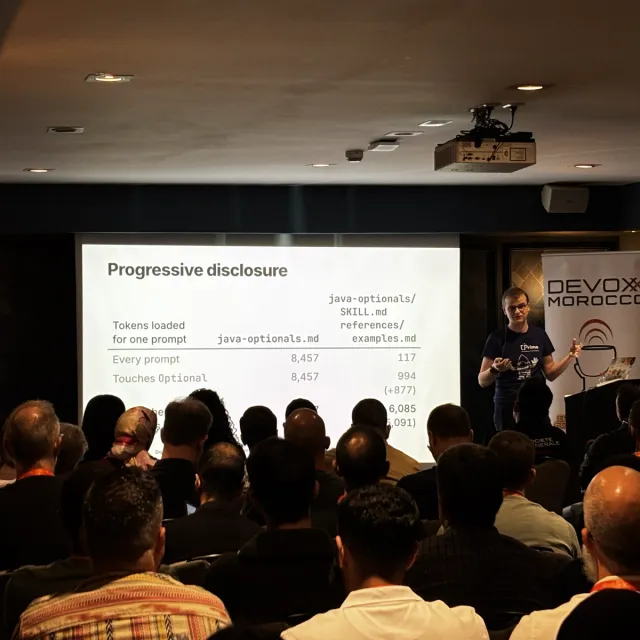
Don't put everything in one file. Keep SKILL.md to the essentials and point to other files for details and examples, so the agent only reads them when it needs them. The same applies to files.
The agent opens the skill. With one big file, everything comes in at once.
- SKILL.md
- references/rules.md
- references/examples.md
Build the skill from your corrections
Once the agent finally produces what you wanted, ask it to write the skill from that same conversation:
Check the transcript of this conversation for what was bad and what was good.
Use that to create a skill for Optional code in Java.
Don't add things speculatively. Base it on what you implemented badly without my guidance.
Agents learn well from before and after examples, so the skill should show the bad attempt next to the better final version.
Then check that it works: check out the commit from before your first prompt, install the skill, and send the exact same first prompt. If the agent now gets it right in one round, the skill works. If not, improve the skill and replay again.
Turn the replay into evals
Replaying works, but you have to remember the commit and the prompt forever, and colleagues without access to your code can't run it. The fix is an , built like a good bug report: a minimal reproducible prompt.
- One prompt that reliably triggers the problem, written the way someone would actually ask.
- No hints at the answer. If the prompt mentions the right method, the eval proves nothing.
- A checklist out of 100 points. For example: 60 for the right approach, 20 for avoiding anti-patterns, 20 for behavior and readability.
Each eval runs twice, with and without the skill, and an LLM grades both against the checklist. The agent never sees the checklist, and the grader never sees the skill. Tessl runs exactly this and publishes the results for each skill in its registry. With a good prompt and checklist, the scores turn out to be very consistent from run to run.
The number to watch is lift: points with the skill divided by points without it.
Evals also give the agent a goal it can work toward on its own: "Improve the skill until it scores 100% on all evals, without making it so specific that it copies the evals."
Read the evals: agents cheat
Agents writing their own evals will take shortcuts, like an eval that awards points for copying a command straight out of the skill. An eval that only the skill can pass is not a test. Before trusting a lift score, check:
- Is the prompt realistic? Would anyone actually type it?
- Could an agent without the skill pass at all? If it needs information that only the skill has, the comparison is unfair.
- Are the points weighted toward what matters? If formatting is worth 90 points and correctness 10, the lift means nothing.
- Does the skill contain the eval's code word for word? Similar shapes are fine, identical examples are not.
When the skill doesn't trigger, fix the description
If the agent writes bad code but fixes it as soon as you say "check with the Optional skill", the skill's content is fine. It just didn't trigger, so the description needs work, not the instructions.
Keep the skill learning
Corrections still happen after a skill ships, so close the loop:
- When he corrects the agent on code the skill covers, a skill files an issue on the skill's repository, with the code before, the corrected code, and why it changed.
- Until that issue is fixed in the skill, a file linked from AGENTS.md holds the new rule as a temporary override, so the agent already follows it.
- When the issue closes, the override is removed.
It made a visible difference. Across 1,800+ prompts in one project, 20 corrected Optional or Streams code: 17 before the skill was installed, 3 while it was being refined, and none in the two weeks after.
When to write a skill
- You've corrected the agent twice for the same thing.
- You're copying the same paragraph between AGENTS.md files in different repositories.
- You keep reusing an old conversation because "it already knows what I want". Colleagues don't have that conversation, but they can install a skill.
A skill that builds skills
To skip the manual steps, there's build-a-skill. Run /build-a-skill in the conversation where the agent finally got it right. It finds where the problem started, writes the skill from your corrections only, turns your own cases into evals, then replays your first prompt and runs the evals with and without the skill. You still read the evals.
Resources
- The talk: slides and materials, build-a-skill
- His skills: Java Optionals (evals on Tessl), Java Streams
- The format: agentskills.io
- Evals and registry: Tessl
- Corrected the agent twice? Write a skill, built from that conversation, with before and after examples.
- Keep SKILL.md small and move details into files the agent opens when needed.
- Write the description for when to trigger. If the skill works when called by name but not on its own, fix the description.
- Prove it with evals: a realistic prompt with no hints, a 100-point checklist, runs with and without the skill.
- Look for a lift of 1.5x or more before letting a skill take up context.
- Read the evals yourself. Agents will write evals that only the skill can pass.
- Feed new corrections back into the skill, with a temporary override until it's updated.
The core idea: you will migrate eventually, to a bigger setup, another region or another cloud. A few cheap decisions made early decide whether that migration takes a week or a year. None of them needs Kubernetes or Kafka.
It's fine to start simple. Here's what to do from day one anyway:
One VM does everything. Fine for now, hard to move later.
- ComputeVM + LambdaTied to Lambda's libraries
- StorageS3
- MessagingNoneDirect calls
- DatabasePostgres on the VMWon't scale
- MonitoringCloudWatch
Containerize everything
Even the small script that downloads files and processes them. It takes minutes, especially with AI, and containers run anywhere: on a single VM today, on a serverless platform or Kubernetes later. You don't need Kubernetes to use containers.
Avoid code that only runs on one platform's function runtime. Code written against Lambda's own libraries is easy to start with and hard to move. Lambda can run container images too.
Postgres for relational data, a bucket for everything else
- Relational data goes in Postgres. It's open source, supported everywhere, and every managed cloud database speaks it.
- Everything else goes in object storage, caches included, instead of piling up MariaDB, Redis and friends you'll have to migrate one by one.
- Write bucket data as . When someone wants to do data science on it later, it's already a data lake that BigQuery or Snowflake can query.
Go event-driven early, without Kafka
Event-driven design is harder than picking a database, which is why teams put it off. But retrofitting events into services that already call each other directly is far harder. Start with the simplest version:
- Let the bucket trigger the work. Every cloud bucket can notify a queue when a file lands. The fetcher uploads, the queue gets a message, the processor picks it up. No polling, no orchestrator.
- Use a serverless queue, not Kafka. Most teams use Kafka as a plain message queue, so SQS/SNS, Pub/Sub or Azure Service Bus do the job without brokers to manage.
- Use an so database changes become events too:
await db.transaction(async (tx) => {
	await tx.insert(orders).values(order);
	// Same transaction: the event exists if and only if the order does
	await tx.insert(outbox).values({ type: "OrderPlaced", payload: order });
});
// A small relay publishes outbox rows to the queue and marks them as sent
Security you'll forget
- No static keys. Use short-lived tokens and workload identity.
- Give roles to groups, not users, even when the team is three people.
- No on databases and internal services. Put a load balancer or private connection in front instead.
- Keep secrets in a secret manager and mount them as environment variables. Every cloud supports this.
- Harden every pod by default, and sandbox anything that runs agent-written code with or Kata Containers, since a normal container can be escaped:
apiVersion: v1
kind: Pod
metadata:
  name: agent
spec:
  automountServiceAccountToken: false
  runtimeClassName: gvisor # sandboxed runtime for agents
  securityContext:
    runAsNonRoot: true
    seccompProfile:
      type: RuntimeDefault
  containers:
    - name: agent
      image: europe-docker.pkg.dev/acme/agents/agent:1.4.0
      securityContext:
        allowPrivilegeEscalation: false
        readOnlyRootFilesystem: true
        capabilities:
          drop: ["ALL"]
Name things consistently
Pick one naming convention and use it for every resource. It looks like a detail, but inconsistent names mean you can't write one Terraform module for every environment and region.
■ region · ■ environment
Don't overdo it either. A convention that forces a two-letter country code breaks the first time a project spans a whole region, or is global. Make names readable and descriptive within your constraints.
Give your AI agents your standards
When everyone generates infrastructure with AI, every agent reinvents its own patterns and rereads the whole repo to add one resource. Write your engineering standards down where agents can find them:
- Point an agent at your existing repos to extract the patterns you actually use, then edit them into rule files: naming, network layout, default cluster settings, how databases connect privately.
- Share them across projects: a central AGENTS.md that points to the rule files, plus an MCP server that serves your standard Terraform modules and pipelines, installable with one command.
- Verify the agent read them. Agents are non-deterministic and sometimes skip the rules entirely. Asking "did you check our standards?" often makes them rewrite the code to match.
Two migrations, two lessons
"It's just a container" can be a monolith in disguise. A small Azure app (one Windows VM, SQL Server, one container) looked like a one-week move to Cloud Run. The "container" turned out to serve the frontend, run background jobs, orchestrate and fetch third-party data, so it could neither scale to zero nor scale out. It still moved, but only by making Cloud Run behave like an always-on server: a minimum of one instance, no CPU throttling, and session affinity. Ask what's really inside before planning a migration.
A complex platform built on standard parts moves easily. 160 microservices in four regions on EKS, RDS Postgres, managed Kafka and S3 moved to GKE, AlloyDB, Kafka on Kubernetes (Strimzi) and Cloud Storage. Kafka was mirrored and Postgres replicated both ways with pglogical, so for a while it ran on both clouds at once. Containers, Postgres and standard messaging made that possible.
And one more: don't store non-relational data in a relational database. Email bodies kept in SQL Server made the database expensive to run and very hard to migrate. They belong in a bucket.
Resources
- The talk: abstract on Sessionize
- Data lake formats: Apache Parquet, Apache Iceberg
- Events: Transactional outbox pattern
- Pod security: Kubernetes security context, gVisor, Kata Containers
- Migration tools: Strimzi, pglogical
- Containerize everything, even small scripts. Kubernetes is optional, containers are not.
- Postgres for relational data, a bucket for the rest, written as Parquet or Iceberg.
- Go event-driven early with bucket notifications, a serverless queue and an outbox. Skip Kafka until you truly need it.
- No static keys, no public IPs, roles on groups, secrets in a secret manager, hardened pods, and sandboxes for agents.
- One readable naming convention, with region and environment at the end.
- Write your standards down for your AI agents, and check that they read them.
- Know what's really in "just a container" before you plan a migration.
The core idea: every prompt you send to a hosted API runs on a model you can't inspect, on servers you'll never see. For anything that touches sensitive data, own your agent: run an inside your own infrastructure.
Why it's realistic now
- An agent is a model plus a harness. The loop, the tools, the prompts and the guardrails matter as much as the model. The same model can score very differently depending on the harness, so pick the harness for your model, not because it's trendy.
- Open-weight models are 3 to 6 months behind the frontier, down from about a year. Small models now match last year's large ones, so not every task needs the biggest model.
- They fit on less hardware than you'd think. to 8 or 4 bits makes a model 2 to 4 times smaller for a quality loss of a few percent, and quantized versions are usually ready to download.
API or self-hosted?
| Hosted API | Self-hosted | |
|---|---|---|
| Best for | Frontier performance, low volume, getting started | High volume, sensitive data |
| Cost | Per token, and every agent loop pays again | Fixed: one loop or twenty costs the same |
| The model | Can change or get worse without notice | Exactly the version you deployed |
| Your data | Leaves your network | Stays in your VPC or on-prem |
At company scale, self-hosting breaks even quickly. The bigger reason is data: a useful agent needs your email, documents and tools, and the safest data transfer is the one that never happens. Hosted or not, still ask whether you need an agent at all. A classic ML pipeline does many jobs faster and cheaper.
The open-source stack
- Model: open weights from Hugging Face.
- Your data: Postgres with pgvector for search, LiveKit Agents for voice.
- Prototype locally with llama.cpp or Ollama.
- Serve in production with vLLM. It exposes an OpenAI-compatible API, so switching often means changing a base URL, and it can route simple tasks to smaller models.
- Gateway and priorities: LiteLLM for API keys and usage tracking across teams, llm-d for scheduling and priorities across GPUs.
- Observe everything with OpenTelemetry, sent to a backend like Langfuse: which tools the agent used, why, at what cost, and which deployed models nobody uses.
// Same client code: only the base URL changes from a hosted API to your own vLLM
const llm = new OpenAI({ baseURL: "http://vllm.internal:8000/v1", apiKey: process.env.LLM_KEY });
To migrate: find the agents that use the most tokens, move a non-sensitive one to an open-weight model first, evaluate it against the API version, and switch once the results match.
- For sensitive data, run an open-weight model in your own infrastructure.
- Choose the harness as carefully as the model.
- Self-host at volume: fixed cost, a stable model and no data leaving your network. Use APIs for frontier needs and low volume.
- Quantize to fit smaller GPUs for a small quality cost.
- Use vLLM's OpenAI-compatible API so switching is mostly a base URL, and trace everything with OpenTelemetry.
- Not everything needs an agent.